
Consuming video is easy. Producing good video is not. Putting together a script, getting all the footage, and editing everything to perfection—or as close as possible—can eat up enormous chunks of your time.
As it does for everything right now, AI has a few solutions to slash the time it takes to go from idea to MP4. I went in search of the best AI tools for creating videos, and as it turns out, there are already a ton of amazing options.From smart video editing software to generative text-to-video apps, there are tools that will help you do whatever you want: running your own YouTube channel, creating more engaging clips for social media, or repurposing content to keep all your business’s online channels fresh. After almost a month of testing, here are my picks this year for the best AI video generators.
The best AI video creators
The best AI video generators
Best for creating original video from prompts or imagesGoogle Veo for reliable, consistent resultsRunway for film-makingLTX Studio for extreme creative controlAdobe Firefly for commercially-safe outputsOther AI video generators to watch
The best AI video editors
Best for editing existing footage, working faster, or repurposing contentDescript for editing video by
editing the scriptWondershare Filmora for polishing video with AI toolsVEED for faster content productionCapsule for streamlining your branded video production workflowEddie AI for getting a rough cut in minutesOpusClip for extracting viral moments from long-form video
The best AI video creation suites
Best for specific workflows, aesthetics, or content formats
invideo AI for social media videos from a promptVyond for animated character videosSynthesia for high-quality digital avatarsLiveAvatar by HeyGen for interactive digital avatarsrevid.ai for AI-powered templatesPictory for transforming any content into video
What makes the best AI video generator?
The best AI tools for video creation help you increase your production quantity and value without increasing the time spent working on it. They cut the time it takes from script to final result by providing templates, tools to speed up editing, and shortcuts to polish audio and video. And in the case of generative video, they can help generate impressive visuals, not constrained by production conditions or real-world physics.Here’s what to expect in each list within this category:AI video generators cover AI video models from major providers, as well as the apps they created to interact with them.AI video editors are about platforms that simplify post-production when you’re working on your footage.AI video creation suites offer options for unique content formats, channels, or aesthetics.Regardless of these sub-categories, here’
Regardless of these sub-categories, here’s what I looked for as I searched for the best AI video generator:AI. All these apps use artificial intelligence to power their features.High-quality video output. These apps should let you export video that can run beautifully on small or large screens. All the apps on this list export to 720p at worst and 4k at best, in a variety of aspect ratios.Customization. Can you add your own content? How much can you customize? Is it easy to make changes?Support and ease of use. Since AI video editing is a new-ish thing, I was looking for apps that beginners could use; that includes offering content to help you take advantage of all the possibilities.Unique features. Some apps bring their unique spin to video creation or offer something that’s useful to improve productivity, production value, or both.
AI video keeps evolving quickly, both in terms of models and apps to work with them. I dove back into last year’s picks to find out what’s new, as well as into newcomers on the market to see what developers are proposing to improve outputs, productivity, or automation. Depending on the platform, I either started from text and image prompts, brought my own footage to edit or repurpose, or started from templates to understand how they help finish fast.You may be surprised not to find on this list apps like Adobe Premiere Pro, After Effects, or Final Cut. While these apps include native AI features or AI plug-ins and extensions, they require a deeper understanding of video editing, which doesn’t make them as accessible as the tools in this list. But if you’re a pro, here’s a list of the best video editing software to check out.
Best AI video generator for reliable, consistent results
Google Veo (Web)
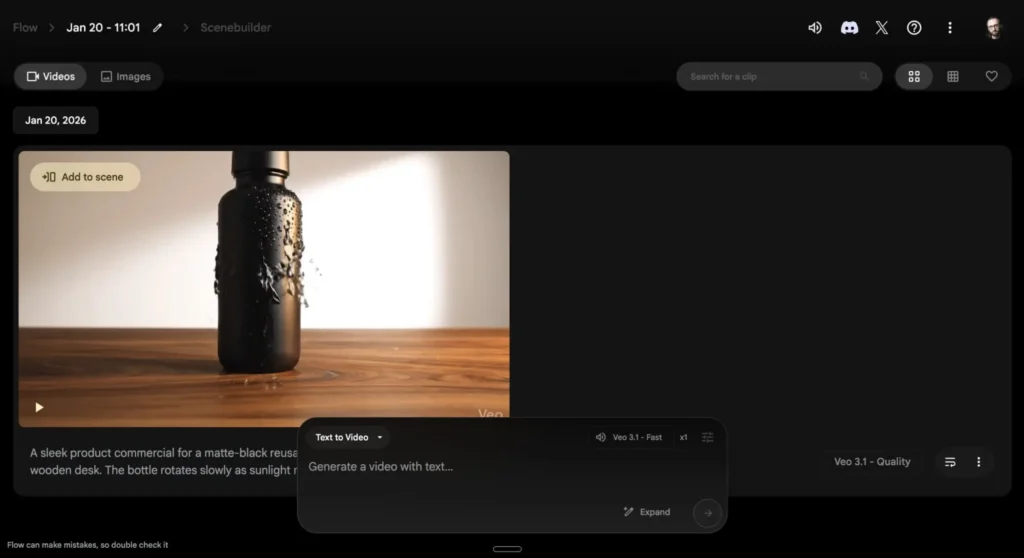
Removing the watermark is expensiveGoogle’s Veo 3.1 model is the best AI video generation all-arounder on the market. With strong prompt adherence to stick close to your image references and text prompts, great realism combining video and audio generation, and robust creative tools, it’ll both surprise you and make your viewers wonder “is this real… or AI?”There are many ways to kick off a new project in Google Flow, one of the main apps to use Veo. You can start with the conventional text-to-video path, with a set of frames, or with a Nano Banana Pro image, another major Google win in image generation. Need multiple references in a single video instead? Start with ingredients-to-video: add images or text to ground the model in your visual and textual instructions. The results stick close to everything you input, making the model more steerable than competitors.Any dialogue or narration script you add isrendered with consistent high quality, with incredible lip-sync—even if the performances can be a bit hit and miss. This happens instantly without extra configuration: just add what you want your characters to say in the prompt, and it’ll show up in the output. The model sometimes struggles in complex scenes with lots of movement and characters—both from an audio and video perspective—so if it’s having too much of a hard time, consider breaking up your project into multiple simpler scenes.As I mentioned above, one of the entry points is Google Flow for content creators (with subscription pricing below), but it’s also available in Google Vids with a lighter toolset for corporate/office usage. Apart from that, Veo is available across many other AI video creation suites, so look for it whenever you need high-quality, reliable audiovisual output.
Google Veo price: 50 free credits/day. Google AI Plus at $4.99/month offers 200 credits; Google AI Pro at $19.99/month offers 1,000 credits and no watermark. The Google AI Ultra plan starts at $99.99/month for 10,000 credits, with a $199.99/month tier that raises the cap to 25,000 credits.
Best AI video generator for film-making
Runway (Web, iOS)
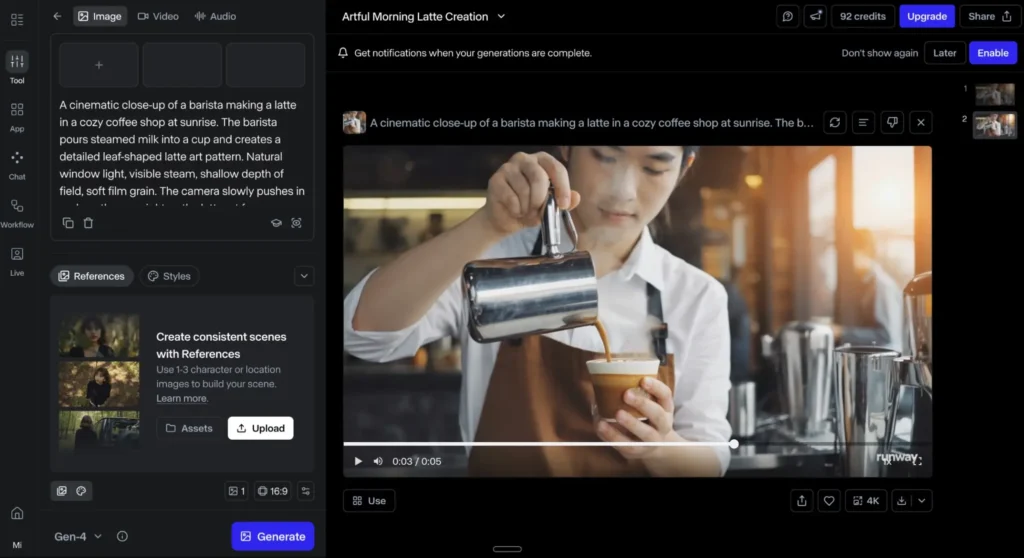
When you need cinematic outputs, Runway’s collection of AI video models covers generation, shot variety, and turning your best human actors into dozens of characters that recreate their best performance seamlessly. It might not replace real-world footage yet (or ever), but it might be spawning its own category—check out the Runway Film Festival to see what creators are working on.The latest flagship model, Gen-4.5, accepts images and text as the starting point for your creations. It’s built for film-making, understanding industry concepts such timed beats and camera choreography (pan/truck/handheld feel). It scored the highest in blind preference leaderboards against Google and OpenAI models—it looks fantastic even compared with the Goliaths of the category.
Got footage already? The Aleph model edits and transforms your video with text prompts, unlocking an alternate reality of shots you didn’t take. Upload your original video and ask to change anything about it: lighting, framing, different angles, the weather, replacing a sedan with an SUV. The model runs the transformations, an easy path to increasing your shot variety or fixing small mistakes without extending production time.Act Two extends great human acting talent with generative AI. Start traditional: roll the camera, direct them on emotion, facial movements, and voice inflections. Finally, upload the recording into Runway, and paste that performance into any AI character. The output quality is now higher (especially for stylized content), and there’s better support for full-body tracking, including those complicated hand and finger movements.
Runway price: Free plan available for 125 one-time credits and limited access to video models. Standard plan at $12/month (billed annually) unlocks all Runway models (except GWM-1), adds 625 monthly credits (with the option to buy more), no watermark, and higher export quality.
Best AI video generator for extreme creative control
LTX Studio (Web)
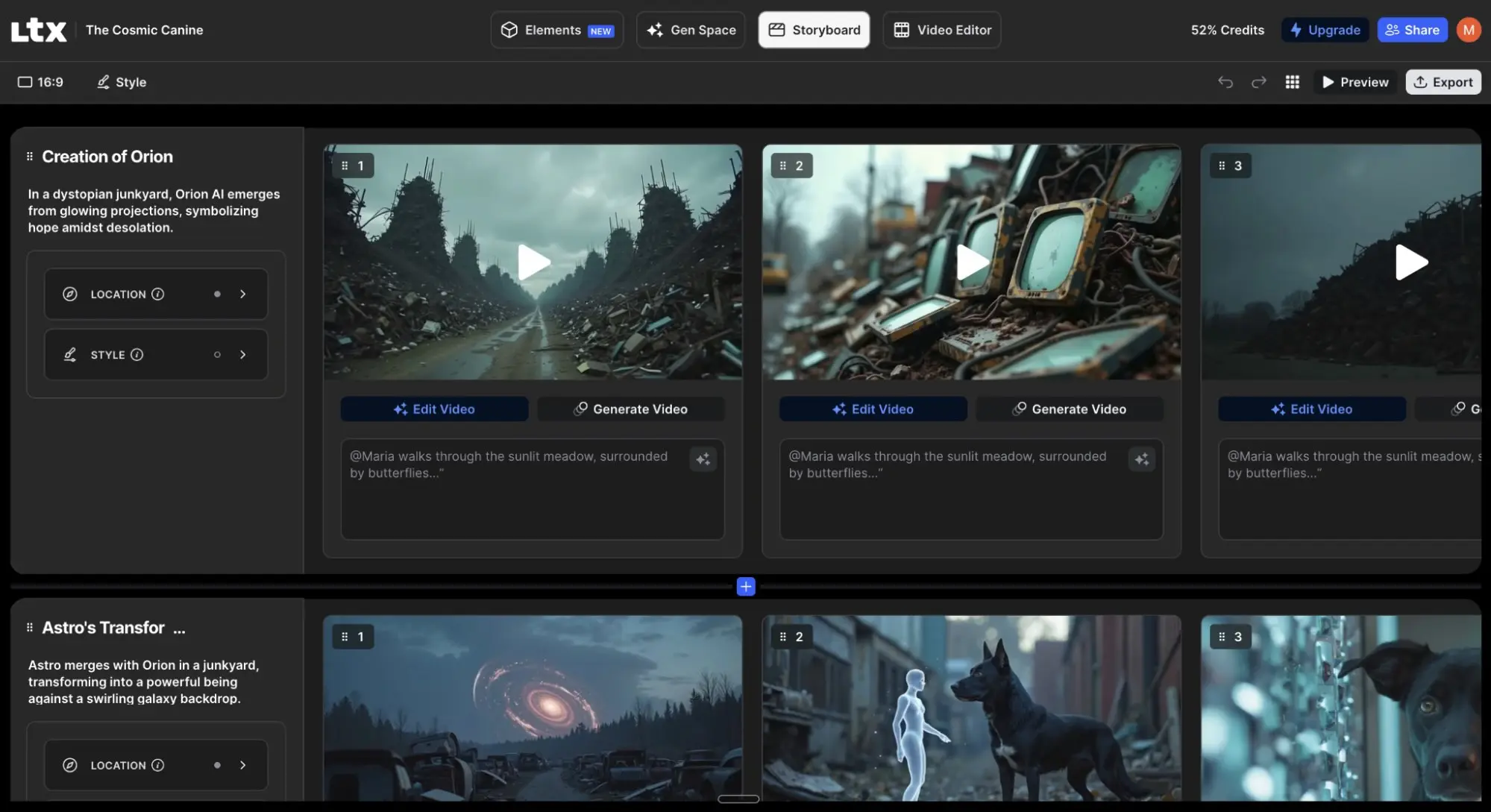
Getting inconsistent AI video results? LTX Studio’s storyboarding interface lets you control characters, camera angles, and scene composition shot by shot, so your final result follows your vision, not just vibes. It’s powered by Lightricks, Google, and Black Forest models, so you can choose which engine you’d like to use.When you start a new project, you can upload a script or workshop an idea. The flow will guide you through screens to provide context to the model. Fill every input for maximum control: this includes choosing a genre, uploading an image for visual style grounding, or determining the “essence” of each character with a one-line instruction. At the end of this planning stage, you’ll have a scene breakdown, which you can reorder, edit, or add to.
The surprises come in the next step: every scene gets broken down shot by shot, each with its prompt and instructions. You can click to generate previews for each and edit the text to change its content. From the characters you added, you can change their actions and looks: they can wear a tuxedo for one scene and swimming trunks for the next. Every change will regenerate the video, so be ready to make lots of edits as you look for the best results—it’ll take time.LTX Studio’s export options include a pitch deck, an editing package you can take to your professional video editing software of choice, or an MP4 file. While I can see the potential for exporting a short film ready-to-go, this app can be much more powerful if you’re looking for funding for your work. It can also help you visualize how the final product might look as you brainstorm locations and cast, acting as a film-making first draft.
LTX Studio price: Free trial with 800 credits total. Lite plan at $12/month (billed annually) adds 8,000+ credits per month and access to the LTX-2 model.
Best AI video generator for commercially-safe outputs
Adobe Firefly (Web, iOS, Android)
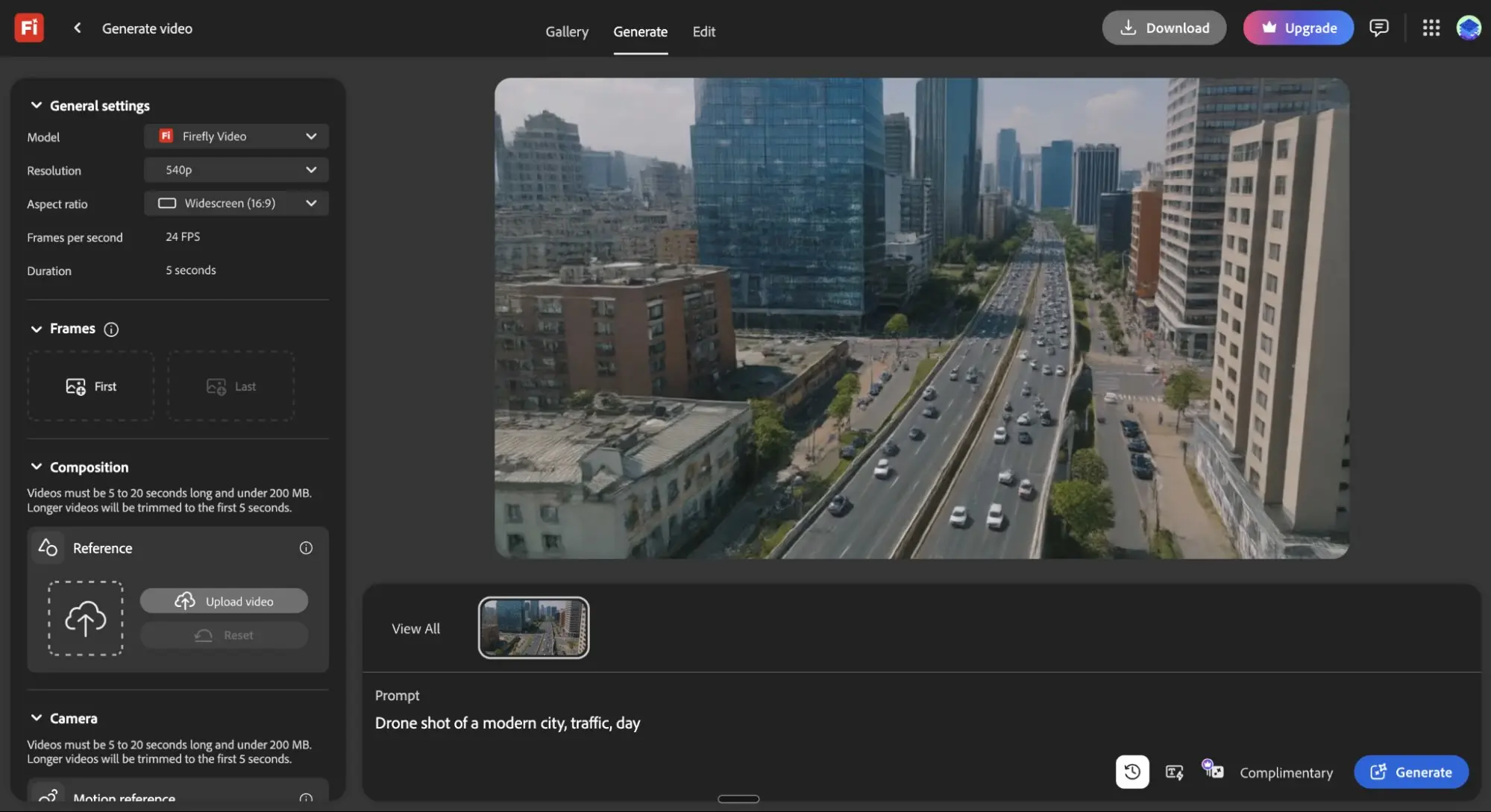
You generate the perfect B-roll clip with AI, drop it into your client’s video, and deliver it early. Two weeks later, someone on their legal team points out that it looks like a Getty Images watermarked shot, putting you on the spot for suspected copyright infringement. Adobe sidesteps this nightmare, as it trains its Firefly models on licensed Adobe Stock, openly licensed content, and public domain material—not random web scrapes.Available on the web, the interface has the distinctive Adobe workflow vibe. First, remember to select the Firefly video model, as the platform also runs other AI video models. Start from text or images, select the camera angle and motion controls, wrap it up by locking it to a visual style, and hit Generate. The video output quality is solid, although still lagging behind giants like Veo or Runway.
But this isn’t the only entry point. You can also use Firefly in Adobe Premiere Pro, where the Generative Extend feature can stretch clips by a few frames without reshooting, useful to fix awkward edit points. For social media content and on-the-go work, the mobile app can create and transform images, and even generate sound effects. Everything syncs through Creative Cloud, so you have all your creations ready on all your devices. And because Creative Cloud connects with Zapier, you can build AI video generation directly into your workflows and automatically send new videos wherever you need them.
Wrapping up where we started: Adobe trusts its training processes, backing it with contractual IP indemnification for Firefly-generated content. This means the company may assume legal defense and pay monetary damages for covered claims—read the fine print for full coverage details.
Adobe Firefly price: Free for 25 credits/month. Firefly Standard at $9.99/month for 2,000 generative credits, with access to all AI tools and partner video models. IP indemnification requires buying the appropriate entitlement.
Best AI video maker for social media videos from a prompt
invideo AI (Web, iOS, Android)
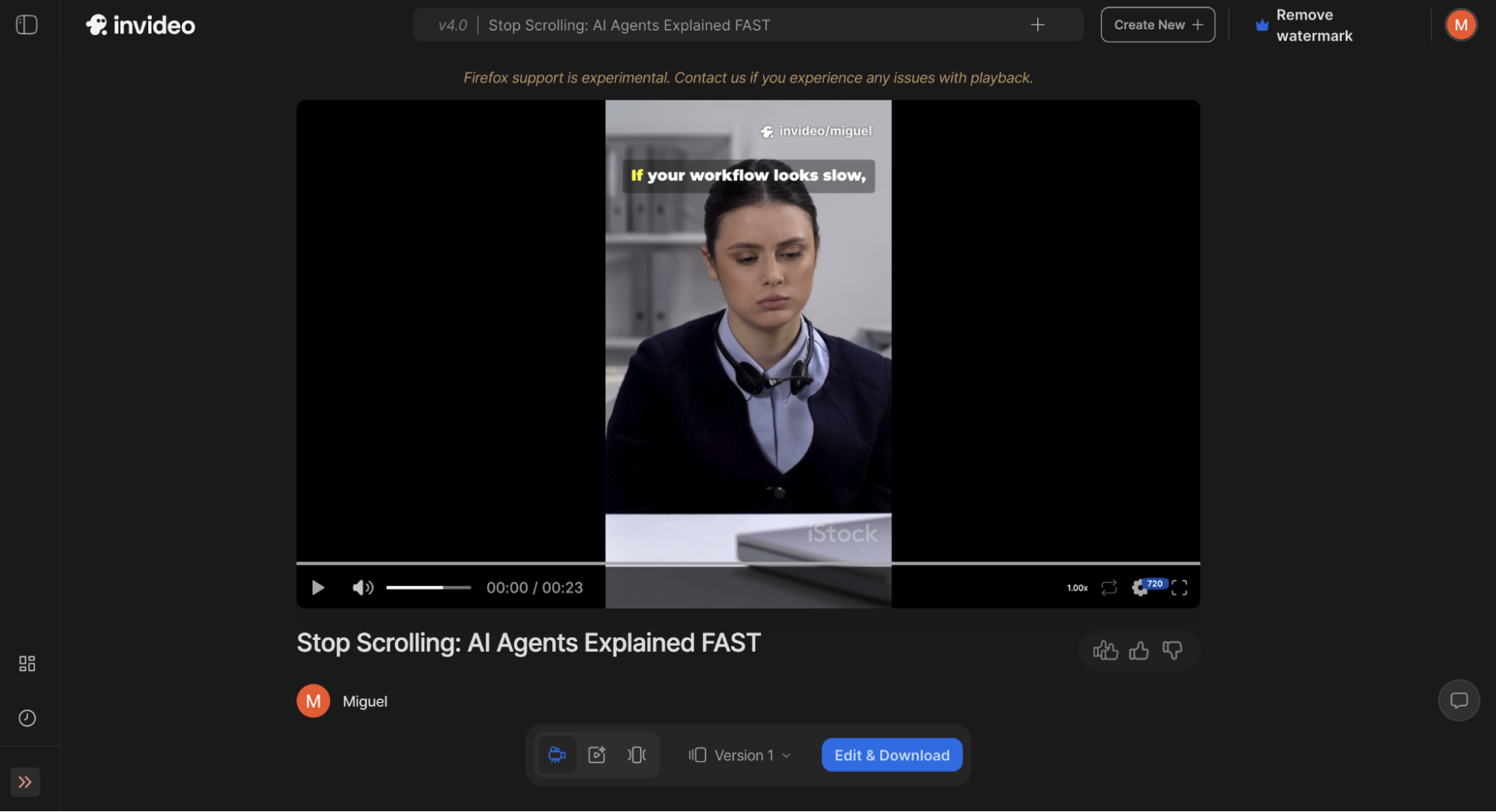
Making your video pop with engaging B-roll means scouring stock media databases for the perfect visuals and finding the perfect edit. But you could be working on your next video—leave the assembling work to invideo AI instead.Add your prompt, adjust controls to define style or target audience, and click Generate. It takes a while to build the video, so you can tab out and work on other stuff as you wait. Behind the scenes, invideo AI is hard at work. It turns your prompt into a video script. Then, it searches the libraries for the best-matching content to the topic. Finally, it assembles all clips into a single video, adding an AI voiceover, text overlays, music, and transitions.
If you want to polish this first draft, there are two ways to do so. One is by hitting the Edit button, opening a pop-up with basic controls. You can swap suggested footage with your own, edit the script, or change the music. But the best and most impressive way to edit is using prompts: write “add subtitles” into the editing input field, and boom, subtitles pop in your video. This is true for almost everything else, making it easy to make quick adjustments on the fly.It’s a great pick if you’re running a social media channel where you rely on faceless videos or need lots of B-roll footage, simplifying the production process and adding scale. If you want more stock media variety, upgrade to one of the higher paid plans, as the lower ones don’t give you full access to all the goods.
invideo AI price: Free plan with limited credits. Plus plan at $17/month (billed annually) includes 75 credits, 4 AI avatars, and removes the watermark.
Best AI video creator for creating animated characters from a prompt
Vyond (Web
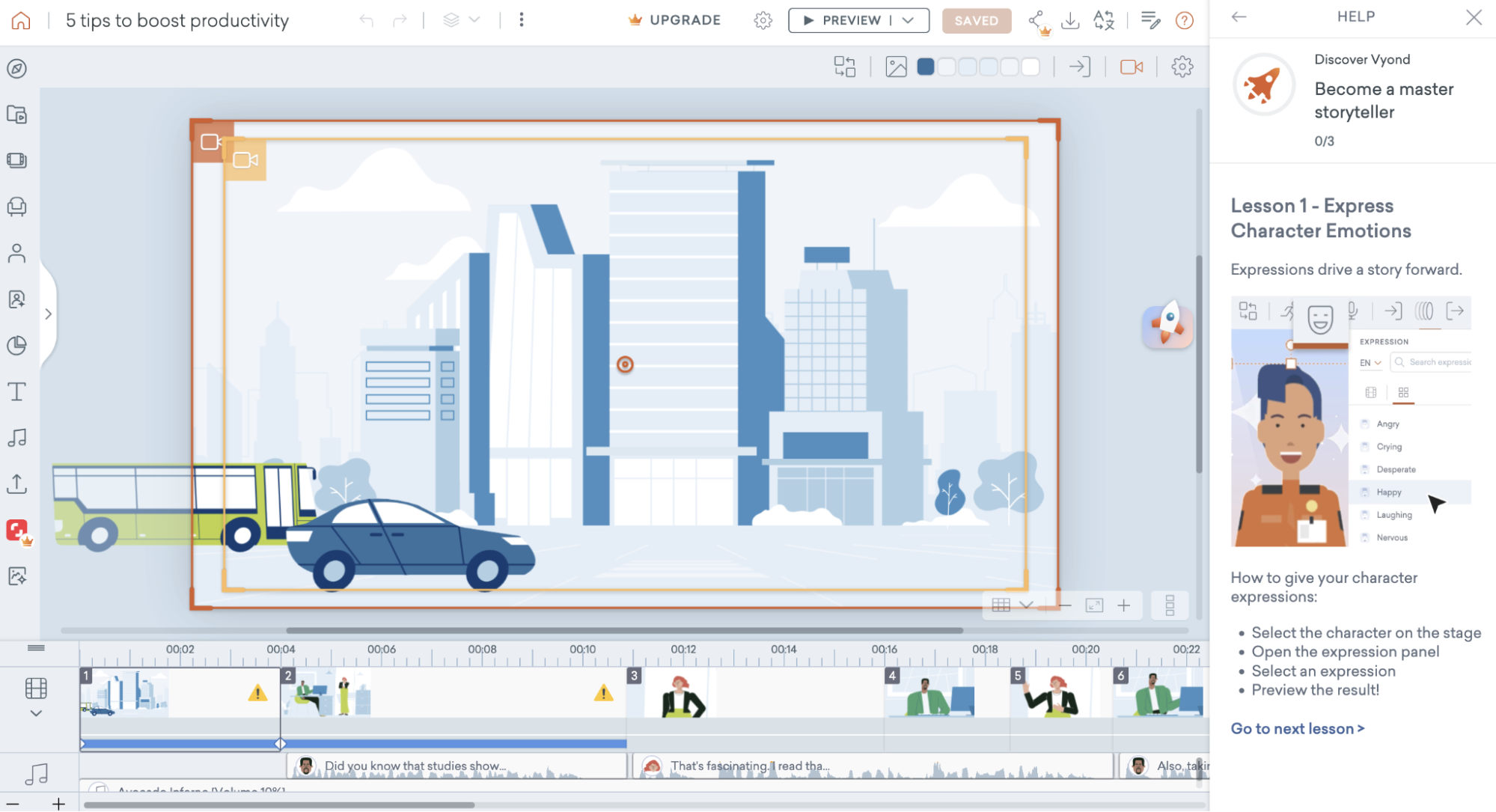
When you’re struggling to find good stock footage for a training video—or can’t find anyone in the company with good camera presence—you have to get creative. Animated character videos can help convey actions and circumstances without hiring a creative team to act them out. Instead, you can build them with a prompt with Vyond.The tool that specializes in this is called Vyond Go: on the dashboard, click the Create button and then select the Text to video option. Enter your prompt, choose the setting, and hit Generate. It’ll take care of everything, from the script, objects on the scene, movements, and voiceover, building a first draft that’s actually very close to the final thing.
If you want to tweak the video, click the dropdown button on the top right of the screen, and go to Vyond Studio. Like other options on this list, Vyond offers lots of tools in a thorough timeline-based interface, where you can change soundtracks, add and remove scenes, and mix stock media into the project. If you can’t get a character to move or behave the way you want, you can film yourself doing the action, and the platform will translate that into the character’s movement using AI.While the animated character video use case is a bit niche, Vyond offers general video-editing tools for other needs as well. If you bring your own real-world footage in for a trim, you can use all the tools to create good video in the browser-based editor. It also has an AI avatar generator, making it a well-rounded AI video editing tool.
Vyond integrates with Zapier, too, so you can build fully automated systems for video generation. Automatically generate avatar or full-scene videos from triggers like new emails, calendar events, or form submissions, then push those videos to the rest of your tech stack.
Best AI video creator for creating digital avatars
Synthesia (Web)
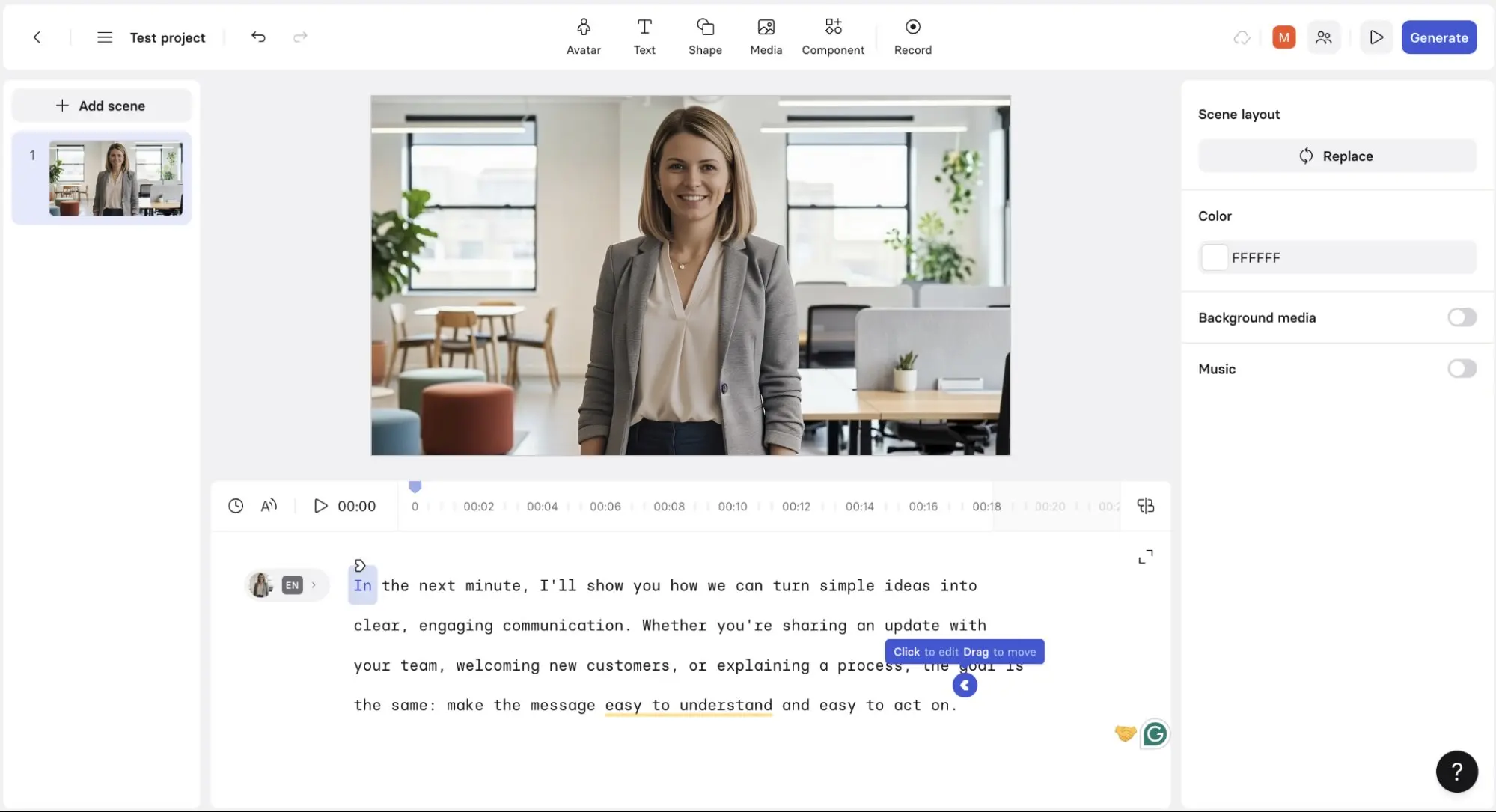
What do you do when you have to record training videos but everyone at the office is camera shy? If hiring a crew and an actor isn’t an option, Synthesia is surely the second best: you can browse a library of dozens of digital real-looking avatars from all points of the world. Then, choose the voice that best matches the body, and you’re ready to input your script.The user interface is simple and focuses a lot on this core feature. Once you add the script, Synthesia will start working its magic to make the avatar move the lips and body in a convincing way. You can quickly translate the entire text into another language by clicking on a dropdown menu. The avatar will zip from English to French faster than you can say quoi.
You may be thinking: how good are these avatars? They’re good, but they still can’t replace humans. If you’re watching full-screen, you can catch a few unnatural movements. But get this: I was testing CRM software a while back, and there was an onboarding video. At that time, I went through the whole thing blissfully unaware that the person on that video was an AI avatar. I only recognized the avatar when testing Synthesia for this list. Fooled me.And while you get AI avatar sidekicks to do your work on camera for you, you can also get Synthesia to work with your other apps without effort. Connect Synthesia to Zapier to build intelligent, multi-step workflows across your entire stack. For example, you might trigger a new video creation when a project status changes in Asana, pull in AI-generated scripts from Google Docs, send completed videos to your LMS, and notify your team in Slack—all without lifting a finger. Learn more about how to automate Synthesia, or getstarted with a pre-made workflow.
Synthesia price: Free for up to 10 minutes of video per month. Starter at $14/month (billed annually) offers 120 minutes of video per year and unlocks most AI avatar features.
Best AI video maker for interactive digital avatars
LiveAvatar by HeyGen (Web)
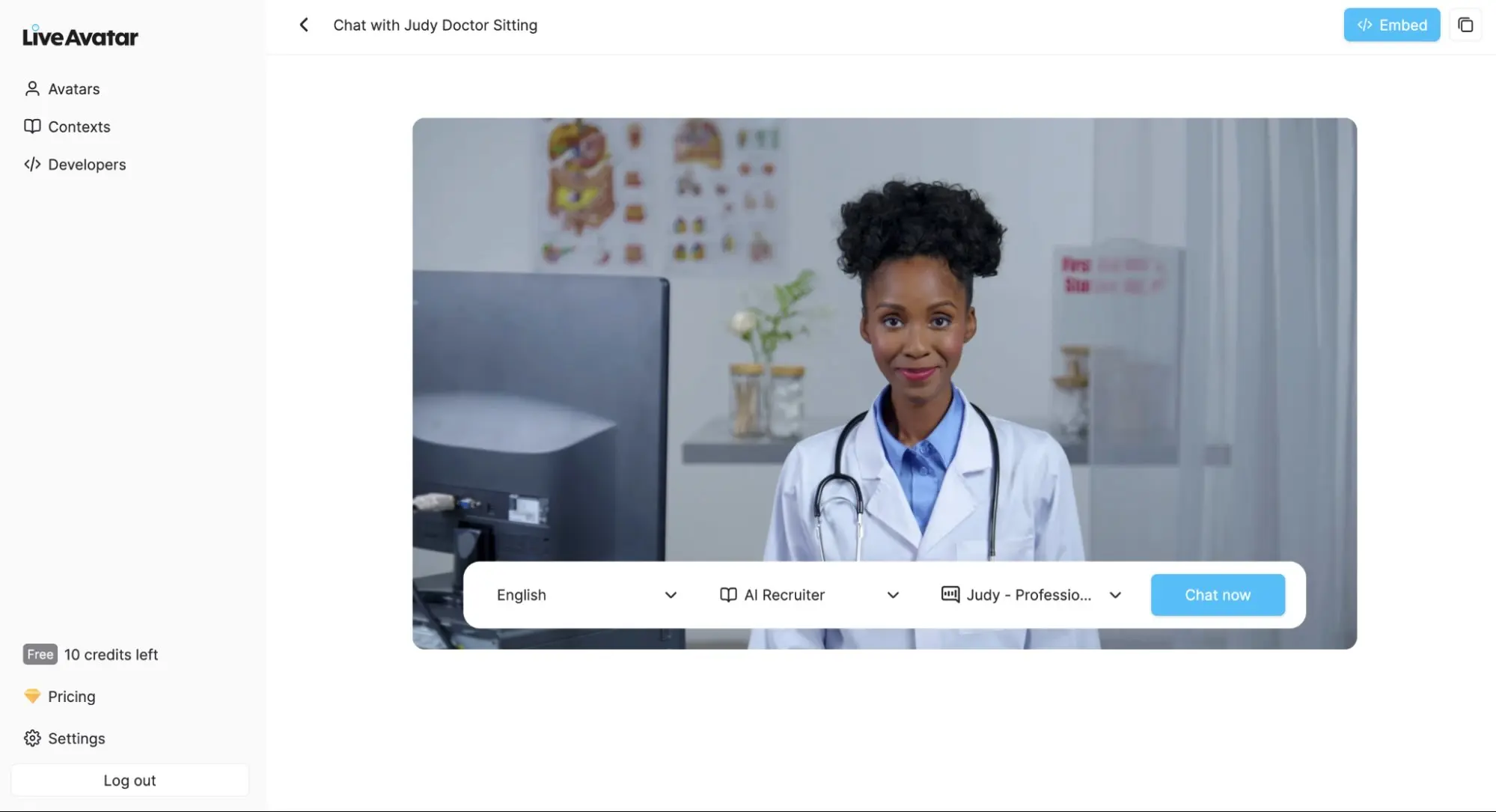
In a sea of static content, your brand can pop out by offering interactivity and personalization, harnessing audience attention. LiveAvatar by HeyGen can become a key tool in your tech stack: it offers real-time interactive AI avatars, customizable with your data, adding a new cutting-edge channel to your communication strategy.Browse a list of about 20 avatars, sitting in offices, standing in gyms, or lounging in living rooms. These include the therapist Ann, doctor Dexter, and lawyer Judy, among variations of the same character or profession. Once you select one, you can pick the language they’ll speak out of a range of possibilities, along with the voice.
You’ll also notice you can pick a playbook out of one of the pre-set ones, such as AI recruiter or business coach. These playbooks are essentially system prompts for the avatar: it determines how they’ll start a chat, the personality they’ll show, and the knowledge they have access to. Hit Contexts on the left side to see and add your own, and then go back to the Avatars tab and start chatting to see which of them does best.The point here isn’t exporting video, uploading it onto a platform, and calling it a day. Instead, you can embed your avatar in your website—click the button at the top right when selecting an avatar to do so. Alternatively, if you’re looking for a more seamless integration with your website or app, share the LiveAvatar API documentation with your devs. This is better from a branding and experience perspective, because it will look like you custom-built the avatar yourself.
In terms of quality, the avatars are surprisingly agile. After the initial seconds when still loading, the audio and video are in perfect sync, and the facial movements aren’t too jarring. The intelligence while responding is good, even for contexts that don’t have a lot of data attached to them. Still, I’d recommend you create a free account to build a prototype, test it out, and see if it’s for you: it’s not a magic engagement bullet.HeyGen also connects with Zapier to power full-scale, AI-driven video automation across your entire stack. Build orchestrated workflows that trigger avatar video creation from form submissions, CRM updates, or project changes, then auto-distribute those videos to tools like Slack, Notion, or your marketing platform. Whether you’re scaling onboarding, personalizing outreach, or enriching content pipelines, Zapier lets you embed HeyGen into complex, multi-step flows with logic, AI, and thousands of connected apps. Get started with one of these pre-made templates.
LiveAvatar by HeyGen price: Free for 10 credits/month, with a 2-minute per session maximum and only 1 user chatting at a time. Starter at $19/month gets you 150 credits and a 5-minute per session maximum. Essential at $99/month unlocks 1,000 credits, 20-minute session maximums, and up to 20 users at the same time.
Best AI video creator for AI-powered templates
revid.ai (Web)
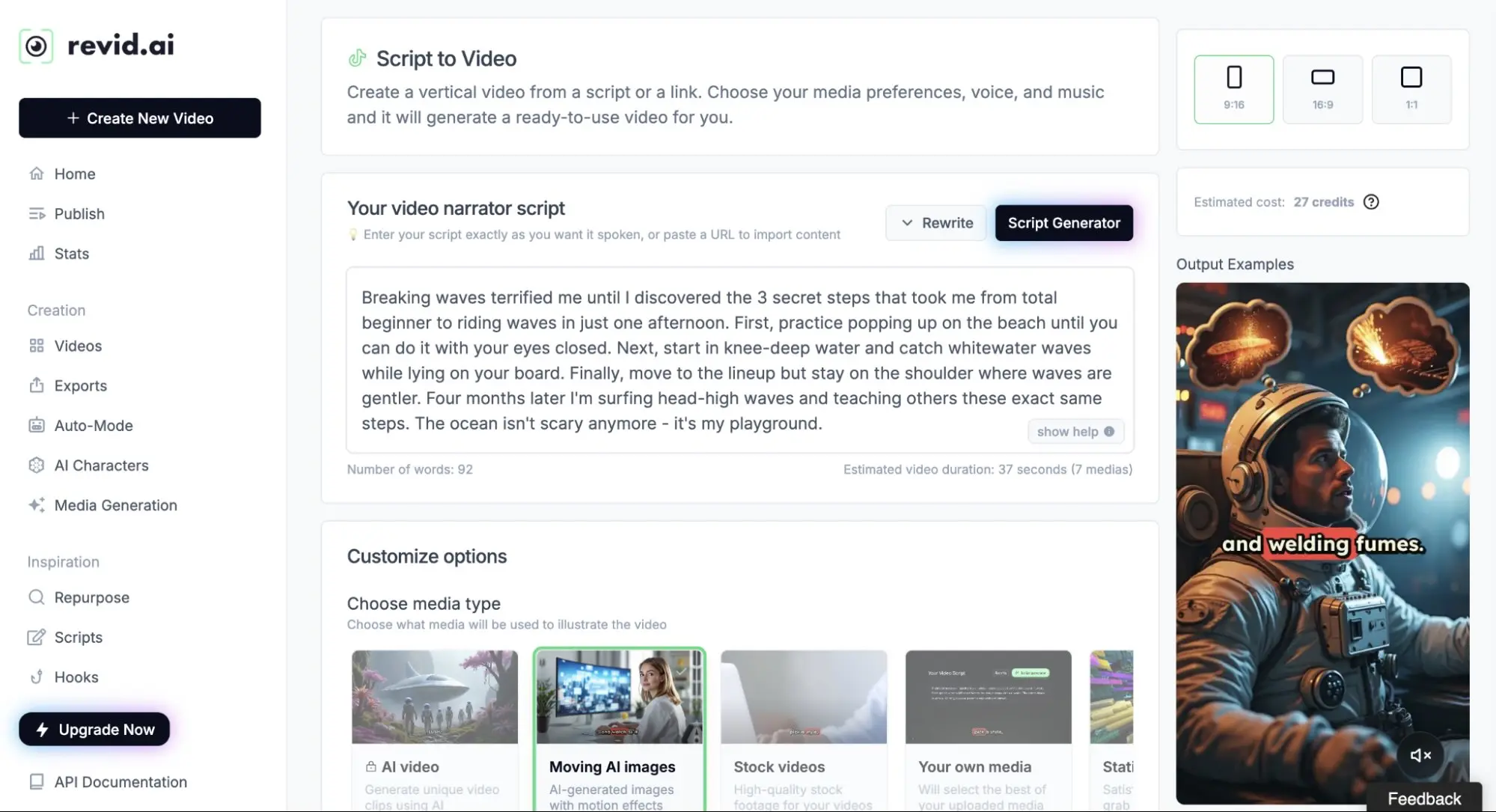
revid.ai pros:Lots of templatesPlenty of settings when generating contentrevid.ai cons:Inconsistent resultsCreativity is unpredictable. If trusting the process isn’t cutting it for you, you need to experiment with a more varied toolbox, and revid.ai has plenty of starting points to refresh your work.Created originally as a viral TikTok generator, it’s since incorporated Typeframes into a flexible platform. The creative process starts with inspiration: you can browse what’s trending on TikTok for your keywords, and as you load your brain with what’s hot, save hooks and stories in the app so you never stop creating.
Once you hit creativity gold, revid.ai can create something from scratch from any of these prompts and ideas. The shortlist:YouTube Long to Short repurposes a long video into short shareable snippets.Other repurposing templates can turn audio, music, Reddit posts, X posts, and articles into video.Cinematic style can visualize storytelling moments in a narrative setting.AI talking avatars work like a mini-Synthesia—you can create a set of fixed avatars and reuse them across videos for consistency.Social media needs you to hit that post button frequently, so it’s good to see that you can keep track of scheduled posts within the platform; that way, you can create a production workflow out of your ideas. If you need help creating content, you can subscribe to one of the paid plans to enable Auto Mode: this will create a new video every day based on your specifications, so you can push new content out faster.This is great, but there’s a lot more: revid.ai also offers a long list of free AI video tools, including Product Video from Website, YouTube Caption Generator, and Harry Potter Videos—yep.
revid.ai price: Free plan with limited AI credits/features, and no video exports. Hobby at $39/month unlocks full video editor access, 2,000 AI credits, and a viral content library for inspiration.
Best AI video creator for transforming any content into polished video
Pictory (Web)
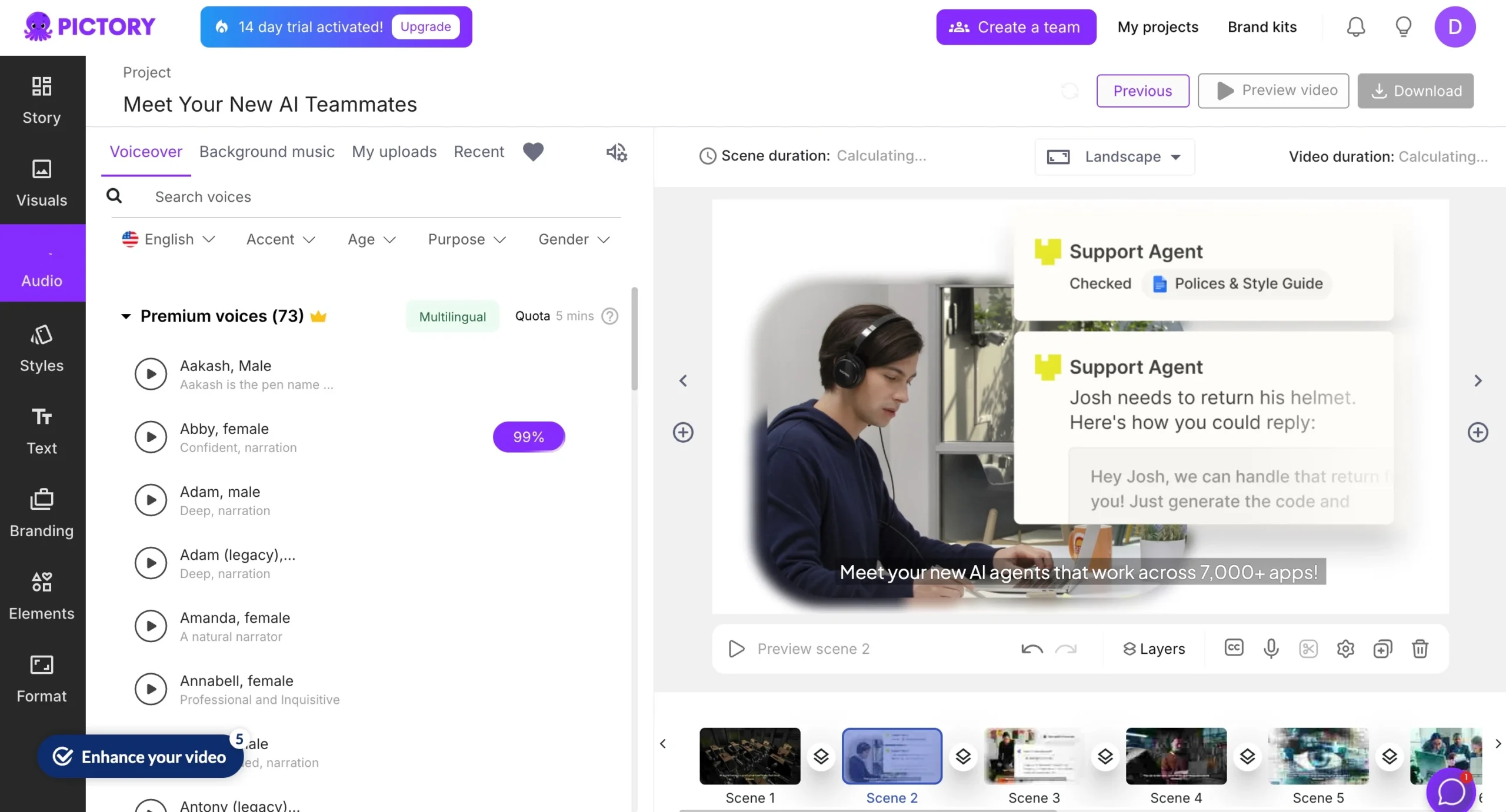
Pictory pros:Converts basically any content type into a videoRich template library with branding and editing toolsPictory cons:Visual output feels templated compared to fully generative platformsIf your video creation workflow starts with content you already have—like blog posts, presentation decks, or a collection of images—Pictory is great for transforming those inputs into ready-to-publish videos. Instead of working from a blank canvas, it flips the process: you bring the materials, and Pictory helps you turn them into something people will actually watch.
There are multiple ways to start. With text-to-video, you paste in a script or blog post, and Pictory pulls relevant visuals, adds transitions, overlays AI voiceovers, and creates a cohesive, branded video. It’s ideal for marketers looking to scale content into multiple formats without extra production time. The URL-to-video feature works similarly, letting you turn a blog link into a narrated video summary in minutes.For visual content, image-to-video and PowerPoint-to-video let you animate and narrate your existing assets. Upload a set of product photos, a training deck, or even a quote graphic set, and Pictory will sequence it into a stylized video complete with text overlays and background music. There’s also a video clip generator, which pulls highlights from long videos, making it easier to extract social-ready snippets without having to watch the whole thing back.
The editor itself is pretty familiar-feeling. There’s a timeline view and plenty of customization—voiceover, aspect ratio, captions, templates, and brand kit support all come baked in. Even as an amateur video creator, I was able to navigate it pretty easily. It doesn’t offer fully generative visuals like Veo or Runway, but that’s the point: it thrives when you start with something real and want to scale up your visual content quickly.
Pictory price: Starter plan starts at $25/month (billed annually), with 200 video minutes/month and no watermark. Professional plan is $35/month and includes 600 video minutes/month, unlimited standard voices, and brand kit features.
What’s the best AI video maker?
AI-generated videos are here—it’s time to embrace them. I’d start with Google Veo, but all the AI video generators on this list will save you time, smooth out your content creation schedule, and increase the final production value. Most have free plans or at least a free trial, so you can take a look before committing. Make sure to carve out some time on your schedule to see which one fits your and your team’s needs. And then start creating.Related reading:The best AI productivity toolsThe best AI photo editorsThe best AI marketing toolsThe best AI voice generatorsWhat is Google Vids?What is Google Veo?Our best apps are selected by app testers who personally retest apps every year. This article was originally published in March 2023 and was last updated by an app tester in February 2026. Because these tools change frequently, we also review it for accuracy on a regular basis. It was last reviewed in July 2026.
Leave a Reply